

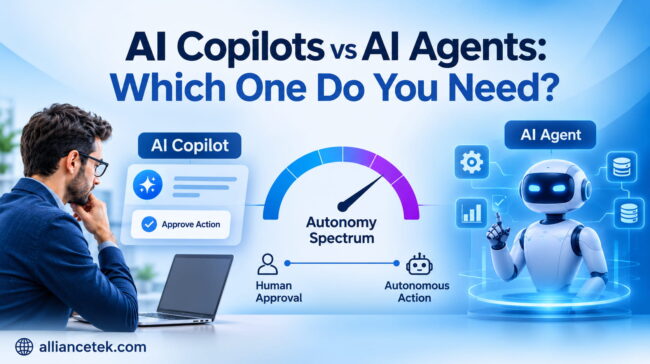
Confused between AI copilots vs AI agents? An AI copilot assists a person who’s doing the work – suggesting text, answering a question, drafting a reply. An AI agent just does the work itself, making decisions and taking action with limited human involvement. That’s the core difference, and it’s the one most teams get backwards before they’ve even picked a vendor. Make the mistake and you either end up with a complex agent where a simple assistant would have sufficed, or you add a simple assistant to a process that really should have been running autonomously.
It’s not some trivial point of knowledge either. It affects your architecture and risk profile.
What Actually Separates the Two
It’s not about how smart the model is. It’s about how much of the loop runs without a person approving each step, and how much judgment the system is trusted to exercise before a human sees the result. This is where agentic AI development services help businesses build systems that can act autonomously while keeping human oversight in place for critical decisions.
1. Copilots Can Do More Than Just Suggest
A copilot isn’t limited to finishing your sentence. Plenty of copilots now execute multi-step actions – pulling data from three systems, formatting a report, even sending it – as long as a person triggers or approves the sequence. What makes it a copilot isn’t the complexity of the task. It’s that a human is still initiating or signing off before anything real happens.
2. Agents Can Run With Supervision, Not Just Alone
An agent doesn’t have to mean “zero human involvement.” Plenty of production agents run with a supervisor checking a sample of outputs, or with specific actions gated behind approval while routine ones execute freely. What makes it an agent is that it’s making its own decisions about the sequence of steps, not that a person is necessarily absent from the process entirely.
3. The Real Variable Is Autonomy, Not Category
Picture a dial, not a switch. On one end, a copilot that waits for explicit approval on every action. On the other, an agent that runs end-to-end with only exception cases routed to a human. Most production systems sit somewhere in the middle, and where you land on that dial should come from the task’s risk, not from which label sounds more impressive in a pitch deck.
Why the Degree of Autonomy Matters Now
A couple of years ago, most teams only had copilots on the table, so the autonomy question barely came up. Now that autonomous AI systems can chain several steps together reliably, where you set that dial has real consequences – not just a clunky user experience, but actual exposure if something goes wrong at scale.
A Framework for Choosing, Not Just Guessing
The honest way to decide isn’t “copilot or agent.” It’s running the task through five questions, because the answer usually points to a specific point on the autonomy spectrum rather than one of two boxes.
1. Task Volume Tells You If Autonomy Pays Off
Low volume, high variability – a handful of unique cases a week – rarely justifies the setup cost of an agent. High volume, repeatable pattern – thousands of similar tickets or transactions – and even a small efficiency gain per instance adds up fast. Volume is usually the first filter, before you even get to risk.
2. Exception Rate Decides How Much Supervision You Need
If 95% of instances go through a routine and 5% of them have something special going on, then you need an agent that will do the 95% on its own and refer the other 5% to a human being. However, if you have about 40% of exceptional instances, then you are just creating an extremely expensive filter, not automation at all.
3. Error Impact Sets Your Guardrails
Not all mistakes cost the same. A miscategorized support ticket is a minor annoyance. A wrong refund, an incorrect permission change, a message sent to the wrong customer – that’s reputational and financial exposure. Map out what a bad outcome actually costs before deciding how much autonomy the system gets, not after.
4. Data Sensitivity Shapes What the System Can Touch
An agent working with public product information carries a different risk profile than one touching financial records, health data, or anything regulated. Sensitive data doesn’t rule out agentic workflows, but it does mean tighter access scoping, more logging, and probably a lower threshold for what triggers human review.
5. Human Review Cost Is the Hidden Variable Teams Skip
This is the one most teams forget to calculate. If a human still has to review every single output regardless of what tool generated it, you haven’t actually reduced review cost – you’ve just changed what’s being reviewed. The point of moving toward agentic autonomy is reducing how often a person needs to look at something, not just making the thing they’re looking at slightly better.
Most Teams Land Somewhere in Between
Few real businesses pick one end of the dial and stop. Most end up running something closer to a copilot for judgment-heavy work and something closer to an agent for repetitive, well-defined work – often inside the same department, sometimes the same workflow, with the autonomy level tuned per task rather than per tool.
1. What That Looks Like in Support
A ticket-handling system runs autonomously for routine cases – password resets, order status checks, standard refunds under a set dollar threshold – and routes anything outside that pattern to a human, who gets a copilot summarizing the account history so they’re not starting cold.
2. What That Looks Like in Sales
The lead qualifying process is conducted with very little management, as a mistake made during this process simply results in a call that is not quite as relevant being scheduled. The copilot role of the software becomes active once the sales rep is actually on the call, with the notes appearing but no action taken without the driver.
What Production Implementation Actually Requires
Picking a point on the autonomy spectrum is the strategic decision. Building a system that holds up once it’s handling real data is where most of the engineering effort goes, and it’s also where most in-house attempts fall short.
1. Permission Controls Need to Be Scoped to the Task, Not the Team
A workflow for refunds does not require access to the HR database simply because it uses the same software as one that requires it. Define scopes of permissions on a per-workflow basis, regularly review them, and do not allow access to grow stealthily through feature addition.
2. Testing an Agent Isn’t the Same as Testing Regular Software
Standard unit tests verify that the program performs what it is supposed to perform. The testing of the agentic workflow will include verification of how it performs under ambiguity in the input, delayed or erroneous response from the downstream system, and situations where it is given an input that slightly exceeds the training pattern for the system. Test adversarial cases – corrupt data, contradictory instructions, boundary condition cases – before the system ever sees production traffic.
3. Monitoring Needs to Catch Drift, Not Just Downtime
A system can be technically “up” and still be quietly making worse decisions than it was last month, especially if the data it’s working with has shifted. Track not just uptime and error rates but the distribution of decisions the system is making – sudden shifts in approval rates, refund amounts, or escalation patterns are usually the first sign something’s off, long before a customer complaint surfaces it.
4. Audit Trails Make Incidents Fixable Instead of Mysterious
It is vital that there be documentation for the event which caused the action, the information which led to the decision and the result. This isn’t just a compliance checkbox. When something does go wrong, and eventually it will, the difference between a ten-minute root-cause fix and a week of reconstructing what happened is almost entirely down to whether the audit trail exists and is actually usable.
5. Exception Handling Is Where Most Rushed Builds Fall Apart
It’s easy to build the happy path. The harder, more important work is defining exactly what happens when a case doesn’t fit – does it queue for a human, retry with adjusted parameters, or fail safely without taking any action at all? Teams that ignore this phase discover this through tough experience – most likely due to a specific instance where the system performs some unexpected action.
6. Enterprise Integration Determines Whether Any of This Actually Works
Even when the problem with a ticket is fixed, the agent will have to communicate with your CRM, your billing software, and maybe even your shipping API without crashing in case any of those systems are momentarily down. Building reliable integrations turns out to be far more code than reasoning about what to do.
Where Outside Expertise Changes the Outcome
Most internal teams can handle a narrow, well-scoped copilot. Where things get harder – and where bringing in people who’ve done this before genuinely moves the needle – is tuning the right level of autonomy and building the infrastructure underneath it correctly the first time.
1. Consulting Helps You Set the Dial Correctly
Figuring out just how autonomous any particular process is supposed to be, and where the human intervention points should occur, is an area of decision-making which can only be helped by having had plenty of experience with it going wrong. That’s where agentic AI consulting comes into its own – before any development begins.
2. Solutions Built With the Production Requirements In From the Start
Permission scoping, testing, monitoring, and audit trails are a lot more expensive to bolt on after launch than to design in from day one. Agentic AI solutions built by a team that treats these as core requirements, not afterthoughts, tend to avoid the reliability gaps that show up when something’s assembled quickly in-house.
3. Development Services for Scaling Past a Single Workflow
One well-scoped agentic workflow, a small team can manage. Five or ten across different departments need shared infrastructure – consistent permission models, centralized monitoring, a common audit approach – and that’s usually the point teams bring in Agentic AI development services rather than rebuilding the same groundwork for every new workflow.
The same applies on the pure build side: once a workflow calls for genuine autonomy, proper AI agent development means treating it like a production system from the start, not a chatbot with extra steps.
Conclusion
Stop asking “copilot or agent.” Ask how much autonomy a specific task can safely carry, based on its volume, its exception rate, what a mistake actually costs, how sensitive the data is, and how much review time you’re trying to save. Most workflows end up somewhere in the middle of that spectrum, tuned differently by task, and the teams getting real value aren’t the ones with the most autonomous system. They’re the ones who matched the autonomy level to the actual risk and built the permissions, monitoring, and exception handling to back it up.
If you’re trying to work out where a specific workflow sits on that spectrum, AllianceTek works through exactly this kind of scoping before any code gets written. Reach out, and we’ll help you map which parts of your process are ready for more autonomy, and which still need a person in the loop.